The Most Common Data Recovery Myths (Debunked)
When your hard drive fails and critical data hangs in the balance, the last thing you need is misinformation guiding your decisions. Yet the data recovery industry is riddled with myths that can cost you thousands of dollars, waste precious time, or worse - permanently destroy your data. After more than two decades of recovering data from supposedly "impossible" cases at ACE Data Recovery, we've seen firsthand how these misconceptions lead people astray. This comprehensive guide separates fact from fiction, drawing on real cases and industry expertise to help you make informed decisions when data loss strikes.
Why Data Recovery Myths Are So Dangerous
Data recovery myths aren't just harmless misunderstandings - they actively put your data at risk. When a Louisiana oil processing plant faced a critical equipment failure in their facility, the stakes couldn't have been higher. Their aging MFM hard drive contained proprietary software from a vendor no longer in business, making replacement impossible. Every minute of downtime cost them thousands of dollars.
The difference between recovery and permanent loss often comes down to the decisions made in those first critical hours after failure. Make the wrong choice based on internet folklore, and you might render professional recovery impossible. Let's examine the most persistent myths and reveal what actually happens behind the scenes at a professional data recovery laboratory.
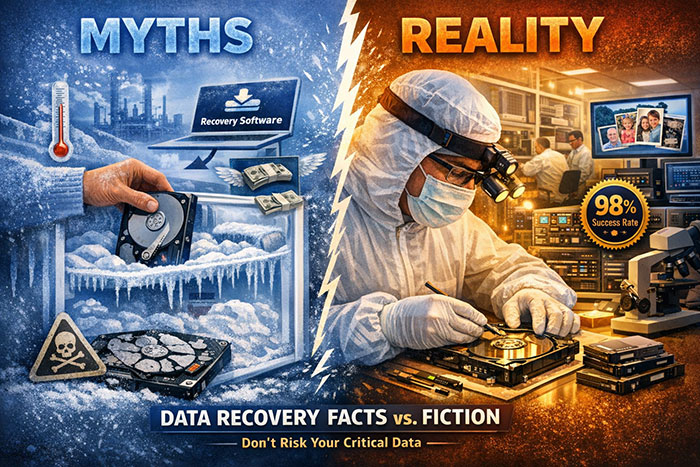
Myth vs Reality: The Most Dangerous Misconceptions
Putting Your Hard Drive in the Freezer Will Fix It
In our Dallas laboratory, we've received dozens of drives that were functioning - albeit poorly - before being frozen. After the freeze treatment, many became completely unrecoverable. The condensation doesn't just sit on the surface; it seeps into the tiny gap between the read/write heads and the platters, a space measured in nanometers. Once contamination enters this space, even our Class 100 cleanroom environment struggles to reverse the damage.
Data Recovery Software Can Fix Any Drive Problem
Here's the critical distinction many people miss: logical recovery versus physical recovery. Logical recovery addresses problems with the file system or accidentally deleted files. Physical recovery addresses mechanical or electronic failures within the drive itself. These require completely different approaches.
When you run recovery software on a physically damaged drive, you're forcing it to attempt repeated read operations. Each read attempt on a failing drive can cause additional head crashes, platter damage, or complete component failure. We've seen drives arrive at our lab where the owner ran recovery software for hours or even days, causing wear that transformed a recoverable drive into one with catastrophic damage.
All Data Recovery Companies Are Basically the Same
At ACE Data Recovery, all recovery work is performed in-house at our Dallas headquarters or our Chicago and Houston laboratories. We never outsource to subcontractors. This isn't just about pride - it's about control, security, and results. When you outsource recovery work, you lose control over several critical factors:
- Chain of custody: Your drive passes through multiple hands, increasing security risks and potential for damage during shipping
- Timeline control: Each handoff adds days or weeks to your recovery timeline
- Quality assurance: You're dependent on unknown technicians with unknown skill levels
- Data security: Your confidential information travels to facilities you haven't vette
- Accountability: When something goes wrong, determining responsibility becomes complicated
We manufacture our own data recovery hardware in the United States - the only company in the country with this capability. This means when we encounter a rare legacy system like the MFM drive from the Louisiana oil plant, we can engineer custom solutions rather than declaring the recovery impossible.
If One Company Says It's Unrecoverable, It Really Is
We regularly recover data from drives that other companies declared completely lost. This isn't because other companies are dishonest - it's because they hit the limits of their capabilities, equipment, or expertise. A company that outsources work to third-party labs can only recover what those partners can handle. A company without cleanroom facilities cannot perform head replacements. A company without firmware engineering expertise cannot address controller-level issues.
A Real Case: A family sent us a 2TB external drive containing their entire digital photo collection from 2004 to 2016. In 2016, the drive failed during a backup operation. They sent it to a company frequently listed among "top data recovery services." That company opened the drive, examined it, and declared it a total loss with zero files recoverable. They offered to dispose of it.
The family kept the drive for six years before finding us. Despite the media stack being exposed by the previous service, our engineers evaluated it and recovered 234,927 files with only 18 having errors. Every photo and video the family thought was lost forever came back. The difference? We had the tools, expertise, and determination to succeed where others gave up.
Data Recovery Is Too Expensive to Be Worth It
Consider the Louisiana oil plant case. The failed MFM drive contained proprietary software from a defunct vendor. Replacement was impossible. Without that software, their entire processing operation sat idle. We transported the drive by jet to our Dallas laboratory and completed the recovery in under 24 hours. The cost of our services? A tiny fraction of the hundreds of thousands of dollars they would have lost to continued downtime.
For businesses, the calculation extends beyond immediate losses:
- Staff sitting idle during downtime
- Contracts at risk due to missed deadlines
- Revenue from halted operations
- Potential regulatory penalties
- Damage to reputation and customer relationships
- Cost of recreating lost data (often impossible)
For personal data, the calculation is different but equally valid. What's the monetary value of your wedding photos, your children's baby pictures, or years of family videos? These assets are literally irreplaceable. No amount of money can recreate them if they're gone forever.
The average project at our facility takes 2-4 days from receipt to completion.
During those few days, we provide transparency, regular updates, and clear communication about your recovery progress. Compare that to weeks or months of attempting DIY solutions, or the permanent loss that comes from choosing the wrong provider.
You Should Try to Fix It Yourself Before Calling Professionals
Every time you power up a failing drive, you risk additional damage. Here's what happens inside a drive with physical problems during each power cycle:
- Head crashes: Damaged read/write heads can scrape against platters, removing the magnetic coating where data resides
- Motor stress: A struggling motor compounds existing mechanical issues
- Electrical damage: Power surges or shorts can destroy controller boards
- Firmware corruption: Repeated failed boot attempts can corrupt critical firmware modules
- Platter scoring: Debris inside the drive gets dragged across platters, creating permanent gouges
The professional approach is different. When a drive arrives at our laboratory, our first step is comprehensive diagnostics in a controlled environment. We assess the exact nature of the failure before attempting any recovery operations. Our cleanroom facilities protect drives from contamination. Our custom tools read data without the repeated stress of normal drive operations. Our engineers understand the microscopic tolerances involved and handle drives accordingly.
Cleanrooms Are Just Marketing Hype
To put this in perspective: a human hair is approximately 75,000 nanometers thick. The gap where your data is read and written is 15,000 times smaller than that. A single dust particle entering this space during a head replacement can cause catastrophic scoring of the platters, destroying data permanently.
Our Class 100 cleanroom facilities maintain air quality standards where no more than 100 particles (0.5 microns or larger) exist per cubic foot of air. Compare this to normal office air containing hundreds of thousands of particles per cubic foot. These facilities are electronically monitored 24/7 to ensure constant compliance with these stringent requirements.
Opening a drive outside a cleanroom environment inevitably introduces contamination. We've received many drives that were opened by other companies or by users themselves. In almost every case, visible contamination appears on the platters - fingerprints, dust, lint, and other particles that compromise recovery chances.
Recovery Success Rates Don't Really Mean Anything
98% Success Rate
Our verified success rate of 98% represents genuine recoveries across all types of failures, from simple logical issues to complex physical failures requiring custom engineering. This number reflects over twenty years of experience since our founding in 2001 and represents tens of thousands of successful recoveries.
But raw success rate numbers can be misleading without context. A company that only accepts easy cases might claim a 99% success rate while referring difficult cases elsewhere. A company that outsources work reports success rates from their subcontractors, not their own capabilities. Our success rate includes the "impossible" cases other labs reject - the legacy systems, the catastrophically damaged drives, and the scenarios requiring custom hardware solutions.
You Can Wait to Deal with a Failed Drive
Several time-dependent factors affect recovery success:
- Corrosion: Internal components can corrode over time, especially in humid environments
- Magnetic decay: While data doesn't "evaporate," magnetic patterns can degrade, particularly on damaged sectors
- Parts availability: Donor parts for older drives become increasingly difficult to source as models age
- Firmware updates: Knowledge bases and firmware tools for legacy systems become harder to maintain
- Memory loss: For failed drives that were in use, remembering exact file names, folder structures, and critical data becomes harder over time
The Louisiana oil plant understood this principle. When their MFM drive failed, they didn't wait. They immediately contacted us, transported the drive by jet, and had us working on recovery within hours. This urgency meant we handled a drive in relatively stable condition rather than one that had degraded further during weeks or months of storage.
If the Drive Is Making Clicking Sounds, It's Definitely Dead
Different sounds indicate different problems:
- Rhythmic clicking: Usually head assembly problems - often recoverable
- Beeping: Typically motor or spindle seizure - recoverable but challenging
- Grinding or scraping: Head crashes or debris - serious but often partially recoverable
- No sound at all: Controller board failure - usually straightforward to address
- Normal spinning but not detected: Firmware corruption or logical issues - often highly recoverable
The critical factor isn't whether the drive is making unusual sounds, but how you respond to those sounds. Continuing to power up a clicking drive causes cumulative damage. Each power cycle risks additional head crashes. But if you recognize the warning signs and power down immediately, professional recovery remains highly probable.
The Truth About Professional Data Recovery
Now that we've debunked the major myths, let's examine what actually happens during professional data recovery and why it differs so dramatically from the misconceptions
The Professional Evaluation Process
When a drive arrives at our Dallas headquarters, it enters a systematic evaluation process designed to assess damage without causing further harm:
- External inspection: Checking for obvious physical damage, water exposure, or previous tampering
- Power testing: Controlled power application to test electronic response
- Sound analysis: Experienced engineers can diagnose specific issues from the sounds a drive makes
- Firmware diagnostics: Reading firmware modules to identify corruption or damage
- Cleanroom inspection: Opening the drive in controlled conditions to examine internal components
- Recovery strategy: Planning the specific approach based on all diagnostic findings
This entire diagnostic process happens before any recovery attempt. We provide customers with a detailed assessment including the cause of failure, recoverable data percentage estimate, cost, and timeline. No surprises, no hidden fees, no uncertainty about what's possible.
Why In-House Capabilities Matter
As the only data recovery company in the United States that manufactures its own hardware, we have capabilities that outsourcing simply cannot match. When we encountered the Louisiana plant's MFM drive, we didn't need to search for a subcontractor with the right equipment. We built the interface tools required to communicate with 1980s-era technology.
This manufacturing capability extends to:
- Custom head positioning tools for specific drive models
- Firmware programming devices for proprietary controller chips
- Cleanroom tools designed for microscopic precision work
- Imaging systems that read damaged sectors other tools cannot
- Test equipment calibrated for drives spanning four decades of technology
When you choose a company that outsources to subcontractors, you're limited to whatever tools and expertise those third parties possess. When you choose in-house capabilities, you're accessing a laboratory that can engineer solutions for problems that don't fit standard recovery procedures.
The Real Timeline for Quality Recovery
Average data recovery projects at our facility take 2-4 days. This timeline reflects our commitment to doing the job correctly rather than rushing through critical procedures. Here's what happens during those days:
- Day 1: Intake, initial diagnostics, cleanroom inspection, recovery planning
- Days 2-3: Repair procedures, imaging operations, quality verification
- Day 4: Final validation, file system reconstruction, delivery preparation
For emergency cases like the oil plant, we can compress this timeline dramatically—but only because our standard procedures are already optimized for efficiency. The 24-hour recovery wasn't luck or shortcuts; it was the result of having expert engineers, proper equipment, and efficient processes ready to execute when urgency demanded it.
How to Protect Yourself from Data Recovery Myths
Questions to Ask When Choosing a Data Recovery Provider
Armed with the truth about common myths, you can now ask informed questions when evaluating data recovery companies:
- Do you perform all recovery work in-house, or do you outsource to third parties?
- Do you have Class 100 cleanroom facilities where physical repairs are performed?
- What is your actual success rate, and what types of cases does it include?
- Can you provide references or case studies from situations similar to mine?
- What happens if you cannot recover my data? (Reputable companies offer no-recovery, no-fee guarantees)
- How do you maintain chain of custody and data security?
- What is your realistic timeline for my specific case?
- Do you manufacture any of your own recovery equipment?
These questions quickly separate companies with genuine capabilities from those making inflated claims or relying on outsourced services.
Warning Signs of Unreliable Recovery Services
Be cautious of companies that:
- Guarantee recovery without examining your drive first
- Offer suspiciously low prices that seem too good to be true
- Cannot clearly explain their process or refuse facility tours
- Provide vague or evasive answers about in-house versus outsourced work
- Rush you into immediate decisions without proper evaluation
- Make claims that sound like the myths we've debunked (e.g., "we can always recover 100%")
- Have poor or fake reviews, or reviews that sound identical
- Cannot provide specific information about their cleanroom classification
Immediate Steps When Drive Failure Occurs
If your drive fails, follow these evidence-based steps to maximize recovery chances:
- Power down immediately: Stop using the drive the moment you notice unusual behavior
- Don't attempt DIY fixes: No freezing, no software tools on physically failed drives, no repeated power attempts
- Document symptoms: Note what happened, what sounds you heard, and what error messages appeared
- Protect the drive: Store in anti-static packaging, avoid temperature extremes
- Contact professionals: Get expert evaluation before attempting anything yourself
- Ask about emergency services: If time is critical, many labs offer expedited handling
Understanding the True Value of Professional Recovery
When the Louisiana oil plant faced their MFM drive failure, they made several smart decisions that ensured successful recovery:
- They recognized the problem immediately and stopped using the equipment
- They didn't attempt DIY solutions on irreplaceable, mission-critical data
- They chose a provider with demonstrated expertise in legacy systems
- They understood that jet transport costs were trivial compared to downtime losses
- They provided clear communication about their specific software and system requirements
The result? Full recovery in under 24 hours, avoiding hundreds of thousands in losses. This outcome was possible because they made decisions based on facts rather than myths.
The Bottom Line on Data Recovery Myths
Data recovery myths persist because they sound plausible and spread quickly through online forums and social media. The freezer myth continues despite being thoroughly debunked because someone's cousin's friend supposedly had success with it once. The "all recovery services are the same" myth persists because distinguishing genuine expertise from marketing claims requires industry knowledge most people lack.
But the stakes are too high to base decisions on internet folklore. Whether you're protecting irreplaceable family memories, business-critical files, or proprietary software that cannot be replaced, the difference between myth and reality determines whether you get your data back or lose it forever.
At ACE Data Recovery, we've built our reputation over more than two decades by delivering results when others cannot. Our 98% success rate, our in-house manufacturing capabilities, our Class 100 cleanroom facilities, and our team of expert engineers represent genuine expertise rather than marketing hype.
When data loss strikes, you deserve accurate information and proven capabilities—not myths, shortcuts, or false promises. The next time you hear someone suggest freezing a hard drive or downloading recovery software for a clicking drive, you'll know better. And more importantly, you'll know who to call for recovery services you can trust.
| Myth | Reality | Risk Level |
|---|---|---|
| Freezing fixes drives | Causes condensation and permanent damage | Catastrophic |
| Software fixes everything | Only works for logical failures, damages physical failures | Severe |
| All labs are the same | Massive capability differences between providers | High |
| Clicking means death | Often highly recoverable with proper tools | Low |
| Too expensive to bother | Data value almost always exceeds recovery cost | Moderate |
| Try DIY first | Reduces professional recovery chances significantly | Severe |
| Cleanrooms are marketing | Absolutely critical for physical recovery | Catastrophic |
| Can wait to address | Time-dependent degradation affects outcomes | Moderate to High |