
Hard Drive Physical Sector Damage and Recovery Routine
Hard drive physical sectors architecture and data reading process
If the disk drive suddenly stops responding or the hard drive simply crashes, what does it mean?
 When data is written to the drive it is encoded. The actual data
itself is never written, only the interpretation of the data. If you
are thinking that a drive contains 0's and 1's then you are
thinking about it incorrectly. The data is more like a wave form
being written to the drive. It has to be interpreted back on its way
out before it becomes a 0 or a 1. Before the data is written the
data is randomized. This eliminates patterns that might be the
same so that ECC is not confused. It is difficult to do pattern
detection on a pattern that appears over and over.
The data structure that is written to the sectors is important to understand if
you are using any diagnostic software. Many of them use common terms to
discuss the types of errors.
When data is written to the drive it is encoded. The actual data
itself is never written, only the interpretation of the data. If you
are thinking that a drive contains 0's and 1's then you are
thinking about it incorrectly. The data is more like a wave form
being written to the drive. It has to be interpreted back on its way
out before it becomes a 0 or a 1. Before the data is written the
data is randomized. This eliminates patterns that might be the
same so that ECC is not confused. It is difficult to do pattern
detection on a pattern that appears over and over.
The data structure that is written to the sectors is important to understand if
you are using any diagnostic software. Many of them use common terms to
discuss the types of errors.Common Hard Drive Error Codes and Diagnostics:
- BSY - drive busy
- DRDY - Drive ready to accept commands
- ERR - The Last Result was an Error
- DREQ -exchange data with host
- UNCR-Uncorrectable Error
- WRFT - Write Fault
- IDNF- Sector ID Not Found . If the sector that holds this information is corrupt there is no way for the hard drive to locate this sector and it will return the result IDNF.
- AMNF-Address Marker Not Found . This is similar to the IDNF but relates to the data. If there is an error and this marker is corrupt then the data for this sector cannot be located. The data in this area is 512 bytes of user data
- ABRT- Command Aborted. - is an abort error and it will discontinue trying to read that block
- TONF - Track 0 not found
- ECC is that there is a problem reading from ECC and it does not match. ECC is used to check the integrity of the data being read. When the data is read the drive calculates the ECC and compares. If there is an error the drive will retry until it cannot get a correct result and then will return the UNCR error
- UNCR-Uncorrectable Error
- WRFT - Write Fault
Heads use servo info to identify the correct track. Then the heads read each and every sector ID block to determine if it is the correct one using the "translator." If the ID field is corrupt there is nothing to identify what the data is looking for and it will flag the IDNF (ID Not Found) error. If it finds the correct sector ID, the heads then would read the Address Marker for the 512 bytes of data that go with that location. If this info is corrupt then the heads cannot locate the beginning of the data and will return the AMNF (Address Marker Not Found) error. An AMNF error means that the ID Marker info WAS found but that the data in the markers that goes with that address were NOT found, again losing 512 bytes of user data.
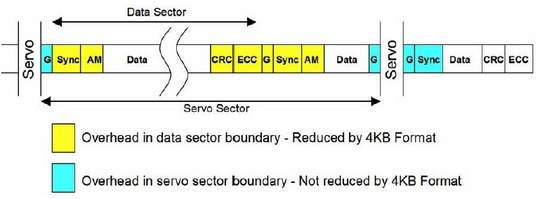
After the data is written, a 4 byte block of ECC data is written. After the 512 bytes are read the drive will calculate the ECC Info and reads the ECC blocks of data and compares them. If they are not equal then the drive re-reads the data until timeout occurs causing the ECC data error. If it is not able to re-read and correct the error it will cause the UNC flag to state that the data in error is uncorrectable. It is possible to do a data recovery ignoring ECC but you will have no way to verify that the data read was correct. This should be done as the last phase to capture the data that could not be read any other way. Heads use servo info to identify the correct track. Then the heads read each and every sector ID block to determine if it is the correct one using the "translator." If the ID field is corrupt there is nothing to identify what the data is looking for and it will flag the IDNF (ID Not Found) error.
The drive tries several different ways to re-read the data before giving up, most of them using ECC. It is possible for ECC to improperly correct data under certain circumstances if the data occurs in a certain order. ECC read commands use ODD numbering of at least 3 so as not to cause a 50/50 chance in the selection of 2. Read ignoring ECC is an LBA 28 command "Read Long" and it was disabled in 48 bits as it was determined to be obsolete in drives over 137 gigs. No Read Ignore ECC is available after 137 gigs. Standard attempts are tried and usually are 10 tries in most hard drives. Reading a drive ignoring ECC can cause possible corruption in the data, but sometimes it is the only way to get the data in those sectors if there is a problem with the PCB or the ECC cannot read the data correctly.