

Desktop Hard Drive Data Recovery
Most of the digital information in the whole world is stored on the desktop hard drives. For the customers that buy them and the people that sell them, large hard drives are a thing of beauty. "Cheap and Deep" is the mantra that calms the nerves of those trying to accommodate an era of surging data and dwindling budgets. On the other hand, for those technical and engineering types that actually make their living making large hard drives work, the impression can be quite different. Our desktop hard drive data recovery service can assist in retrieving data from virtually any desktop device, operating system, or platform..
Unlike their "big brother" enterprise class hard drives, the average desktop hard drive lacks several features and has gaps in the manufacturing process to make them cheaper and more affordable for general customers. For example, the desktop hard drive has limited error correction capability and they aren't specially designed with shock and vibration protection.
Professional Desktop Hard Drive Data Recovery Services
Modern desktop hard drive stores data to the tune of 240,000 tracks per inch. As a point of measure, your typical 20# copy paper measures out at .0038". That works out to be about 900 tracks sitting on a space the size of the edge of a piece of paper. A hard drive head reads these tracks one at a time, so in order to read or write your precious data it has to accurately hit a target 1/900th the thickness of a piece of paper every time it goes to work. To make matters worse, your typical hard drive is enclosed in a computer case and strapped in next to other drives, DVD or other devices, which can vibrate these heads. With a desktop hard drive, it doesn't take much movement to make a head miss a target 1/900th the thickness of a piece of paper.
 When a mechanical shock happens, hard drives may experience damage caused by the read/write heads dropping down onto the moving platters. Normally these heads float on a thin layer of air over the spinning platters, but if a shock happens and the two do come in direct contact, the heads can literally become "glued" to the plates. When this does happen, the heads can only be "unglued" from the plates by a trained engineer using special equipment.
Also, regular desktop hard drive platters are not a subject of full media certification. The times when you could run low level format on your drive are gone. Modern manufacturing process accepts some percentage of bad sectors, which are placed in a so called "P-list" at manufacturing time and are skipped by the hard drive during regular operation without involving the file system software, as it was originally designed 30 years ago at the beginning of hard drive era.
Understanding Desktop Hard Drive Failure Causes and Recovery
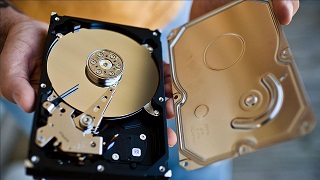 High-capacity hard drives use three or more magnetic disks, or platters. Because of this, the most common failure is a wedging of the drive's axle. The additional platters increase the load on the axle, and the resultant physical stress often leads to premature motor failures. With high-capacity hard drives a drop of only 4 inches can be enough to wedge the axle, which will first manifest itself through increasing hard drive noise and vibration. Some hard drive vendors' designs make drives particularly vulnerable to such shocks and pressure. For example, when vendors don't secure the hard drive axle with a separate screw to the drive cover then any pressure exerted on the housing or cover can actually shift the axle, resulting in it changing its angle, and then damaging the platters.
Regardless of the cause of data loss, whether it's accidental, mechanical, or due to environmental factors, our team of recovery engineers specializing in desktop hard drive recovery have the capability and skills to make things right.
Desktop Hard Drive Recovery: We Retrieve Data from Any Operating Platform and Hard Drive Vendor:
- Window 77
- Window Vista
- Window XP
- Windows 2003/200
- Windows NT
- Window 95/98
- Apple Mac OS
- Linux (All Distributions)
- UNIX (All Flavors)
- Seagate
- Western Digital
- Hitachi
- Toshiba
- Samsung
- Fujitsu
- Maxtor
- IBM
- and more..
At ACE Data Recovery we use only safe desktop hard drive data recovery processes that use sectors-by-sector images. This means we get dump of your drive sector by sector, and we work directly on the drive clone, not on the original media. This will ensure your original drive is not damaged further and that a next image of the original structure can be created at any time if needed.
ACE Data Group's desktop hard drive data recovery process aligns with manufacturer's specifications and does not void your original warranty. If you're looking for hard drive data recovery software or to recover hard drive data, give us a call today. We are the experienced data recovery service.
Latest Publications
By following these guidelines and avoiding common mistakes, you can extend the lifespan of your flash drive and protect your valuable data
Read more..
Understanding and Unraveling the Mystery of Formatted SSDs: Can Deleted Data Be Recovered?
Read more..